Showing posts with label Drupal. Show all posts

Friday, 28 October 2011

Facebook login in drupal

In drupal Facebook connect module used to add Facebook login.

This module also used for twitter login.

This video show the basic integration of Facebook connect module in drupal

 
INSTALLATION

1.  Copy facebook connect module to sites/all/modules folder

2. Create new facebook app in this url https://developers.facebook.com/apps

3. Download php-sdk libraries from  http://github.com/facebook/php-sdk/tarball/v2.1.1

4. Copy this php-sdk to facebook connect module folder
   <fbconnect folder>/facebook-php-sdk/src/facebook.php
5.Enable fbconnect module

6. Enter facebook app key and id in admin/settings/fbconnect page.
 

Sunday, 23 October 2011

Create node theme for content type in drupal

The node.tpl.php is a default theme for all nodes.
If need to change node theme for specific content type follow following steps

1. If u create node theme for page content type, create node-page.tpl.php in your template folder.
2. Copy node.tpl.php to node-page.tpl.php , Importent do not delete default node.tpl.php file
3. Change the theme display for your needs
4. Use variables node.tpl.php
5. If u create node theme for movie page content type, create node-movie_page.tpl.php file.

For more: Theming node by content type

Saturday, 22 October 2011

How delete own comment in drupal

In Drupal user can not delete own comment
So need Comment Delete module.
  1. Unzip and copy this module in sites/all/modules folder.
  2. Enable comment delete module.
  3. Enable required permission in user permission page

Monday, 17 October 2011

How get current username in drupal

Following code used to get current username
<?php
       global $user;
       print_r($user->username);
?>

To get user details
<?php
       global $user;
       print_r($user);
?>

Saturday, 15 October 2011

Create user gallery in drupal

Following module used for create user photo gallery
  1. Views
  2. CCK
  3. Image field
  4. Nodereference_url
  5. Views_attach
  6. CSS_injector

Sunday, 2 October 2011

Add syntax highlighter in drupal

<?php 
if(ereg("^[0-9]{2}-[0-9]{10}$", $phone_number)) {
      echo "valid phone number";
}
else {
       echo "invalid phone number";
}
?>

To activate syntax highlighter in your drupal site to follow the below steps

1. Download syntax highlighter module to following link http://drupal.org/project/syntaxhighlighter
    and extract to sites/all/modules directories

2. The module required following Syntax highlighter javascript library
     download and  extract sites/all/libraries directories

3. Now enable Syntax highlighter module

4. Enable the Syntaxhighlighter filter in an input format Site configuration > Input formats > Configure


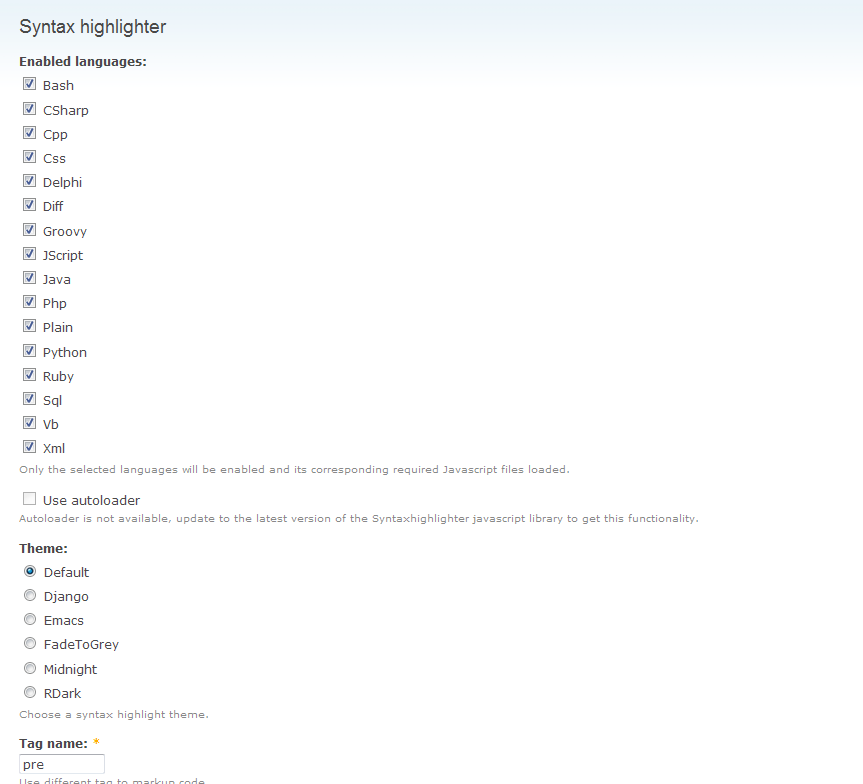
5. Go to admin/settings/syntaxhighlighter to configure syntaxhighlighter module


6. If u need to highlight code to use following pre tag

<pre class="brush: js; highlight: [1, 5]; html-script: true">
     your javascript and html code here
</pre>

<pre class="brush: php; highlight: [1, 5]; html-script: true">
      your php and html code here
</pre>

 highlight: [1, 5] is used to highlight the code lines 1 and 5


Sunday, 25 September 2011

Remove submitted by admin in drupal

move the following global setting page in admin
Site bulding -> Themes -> Configure -> Global settings
Disable Post information in "Display post information on"

Tuesday, 6 September 2011

List the admin menu in drupal

The following code use to display all the menu items in drupal

In user.module file

function user_menu() {

$items['admin/user'] = array(
'title' => 'User management',
'description' => "Manage your site's users, groups and access to site features.",
'position' => 'left',
'page callback' => 'system_admin_menu_block_page',
'access arguments' => array('access administration pages'),
'file' => 'system.admin.inc',
'file path' => drupal_get_path('module', 'system'),
'weight' => 3,
);

}
In system.admin.inc file

function system_admin_menu_block_page() {
$item = menu_get_item();
if ($content = system_admin_menu_block($item)) {
$output = theme('admin_block_content', $content);
}
else {
$output = t('You do not have any administrative items.');
}
return $output;
}
The same module we display our custom module menus

Sunday, 4 September 2011

Create different page templates depending on the current path in drupal

In drupal default template is page.tpl.php.
Drupal check the available template for following order it use the first available template for the current page.
 
1. http://www.mysite.com/node/22
This URL is encountered drupal will check for available templates in the following order.

page-node-22.tpl.php

page-node.tpl.php

page.tpl.php

2. http://www.mysite.com/node/22/edit 
Similarly

page-node-edit.tpl.php

page-node-22.tpl.php

page-node.tpl.php

page.tpl.php

3.  http://www.mysite.com/calendar


page-calendar.tpl.php

page.tpl.php


If you are using URL alias like  http://www.mysite.com/node/2 is http://www.mysite.com/about
To check alias for node in URL aliases->list


Following order is used to check for templates.

page-node-2.tpl.php

page-node.tpl.php

page.tpl.php
 

Friday, 2 September 2011

Create page.tpl for calendar/* all url in drupal 6

calendar for default  page.tpl

Add following function in template.php.
After create page-calendar.tpl.php file in theme folder.
Clear cache and check it.


<?php
function themeName_preprocess_page(&$vars) {
    if (arg(0) == 'calender'){
            $vars['template_files'][] = 'page-calendar';
    }
} 
?> 

 Calendar display using page-calendar.tpl.php ( without right and left side )

Thursday, 1 September 2011

Creating Slideshow in Drupal

Following modules are used to create image slideshow
1. CCK,
2. Views
3. Views Slideshow
4. ImageCache .

Wednesday, 31 August 2011

Views module in drupal

This views module important module of drupal. It used to create views of all content in drupal.
 The views module introduction video


create drupal calendar

Drupal calender module Requires Views and the Date API (packaged with the Date module).


For More to see

Step by Step Setup of Calendar View

Tuesday, 30 August 2011

How to add meta tag to drupal page?

In drupal 6 Nodewords is used for add meta tag in all pages.